✨ PowerTools for Microsoft Copilot | Version 1.0.5 Ready

Supercharge Microsoft Copilot & M365 Chat

Transform your AI workflow with slash command prompt templates, custom chat folders, full-width canvas, side-by-side Diff & Compare code inspector, real-time PII privacy guard, token usage budget tracking, and local multi-format exporters.

https://copilot.microsoft.com — Power Copilot Active
Slash Command Prompt Library Placeholder

10x

Faster Prompt Execution with / Slash Commands

100%

Client-Side Local PII Data Security

5

Languages Supported (EN, DE, PL, ES, BG)

Everything You Need for Peak AI Productivity

Supercharge your daily interactions with Microsoft Copilot and M365 Enterprise Chat.

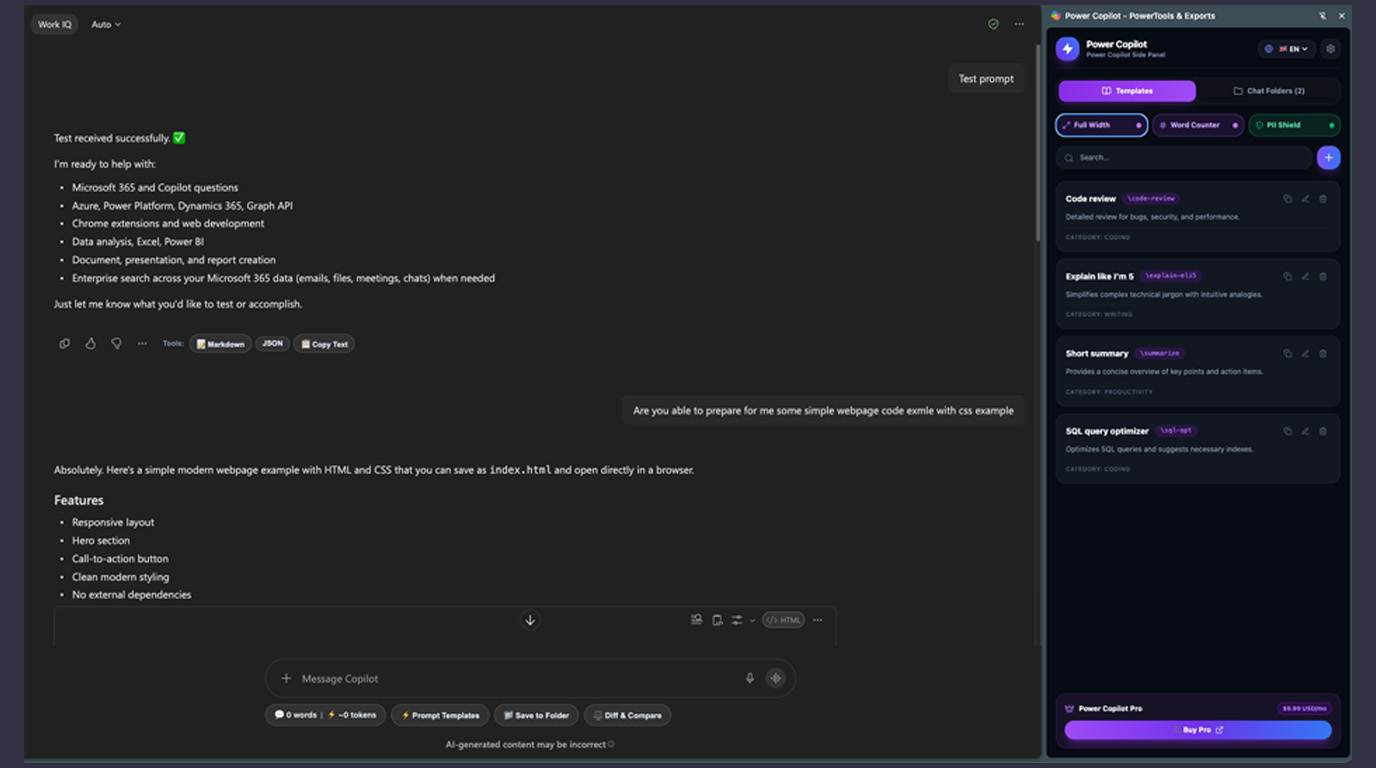
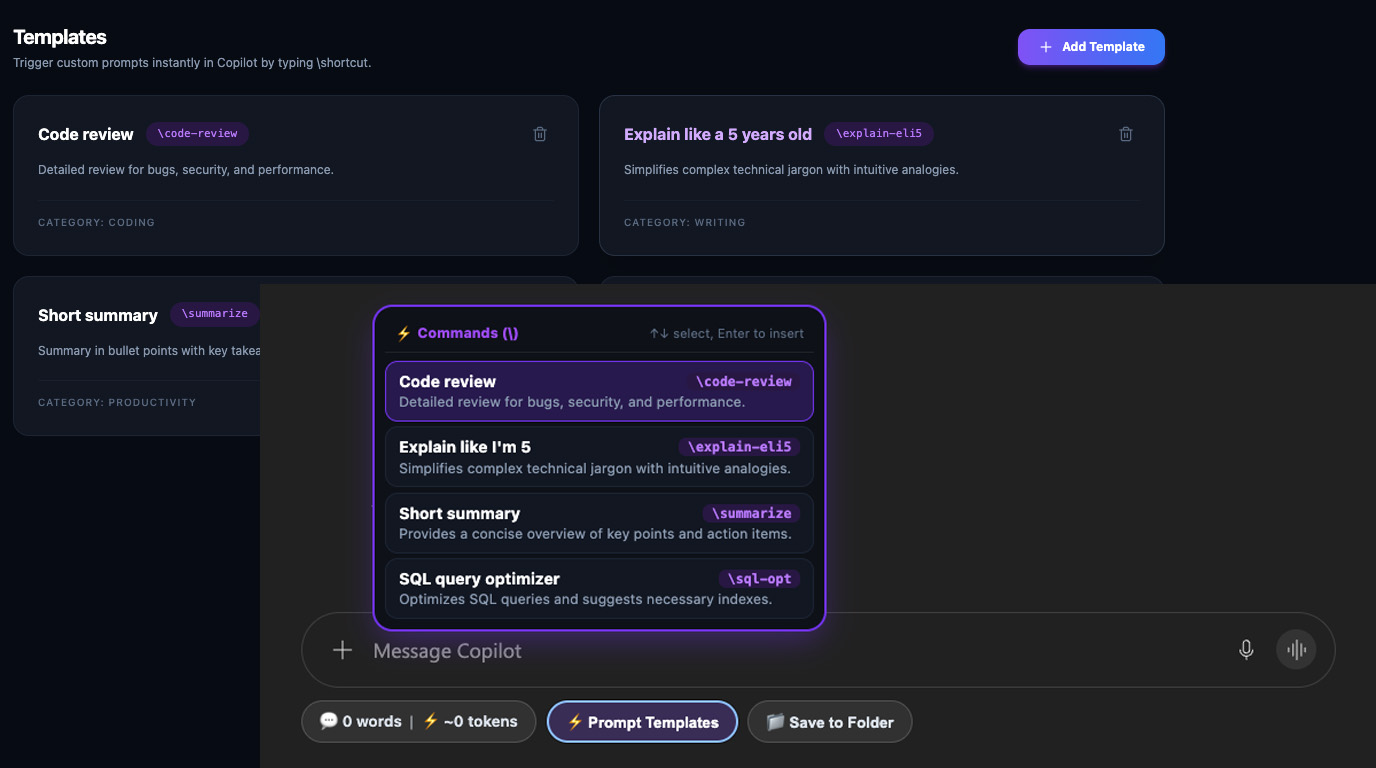
Prompt Templates Library & Instant Backslash Commands (\)

Create, edit, categorize, search, and delete reusable prompt templates. Typing \ inside Copilot's input prompt triggers a real-time autocomplete modal matching shortcut keywords instantly.

  • ✓ Real-time autocomplete modal triggered by \shortcut in chat
  • ✓ Organized by categories (CODING, WRITING, PRODUCTIVITY, MARKETING, LEARNING, CUSTOM)
  • ✓ Manage custom templates & categories in Side Panel & Options page
  • ✓ Pre-loaded with built-in productivity prompt presets
Prompt Templates & Slash Commands Screenshot

Chat Folders & Conversation Management

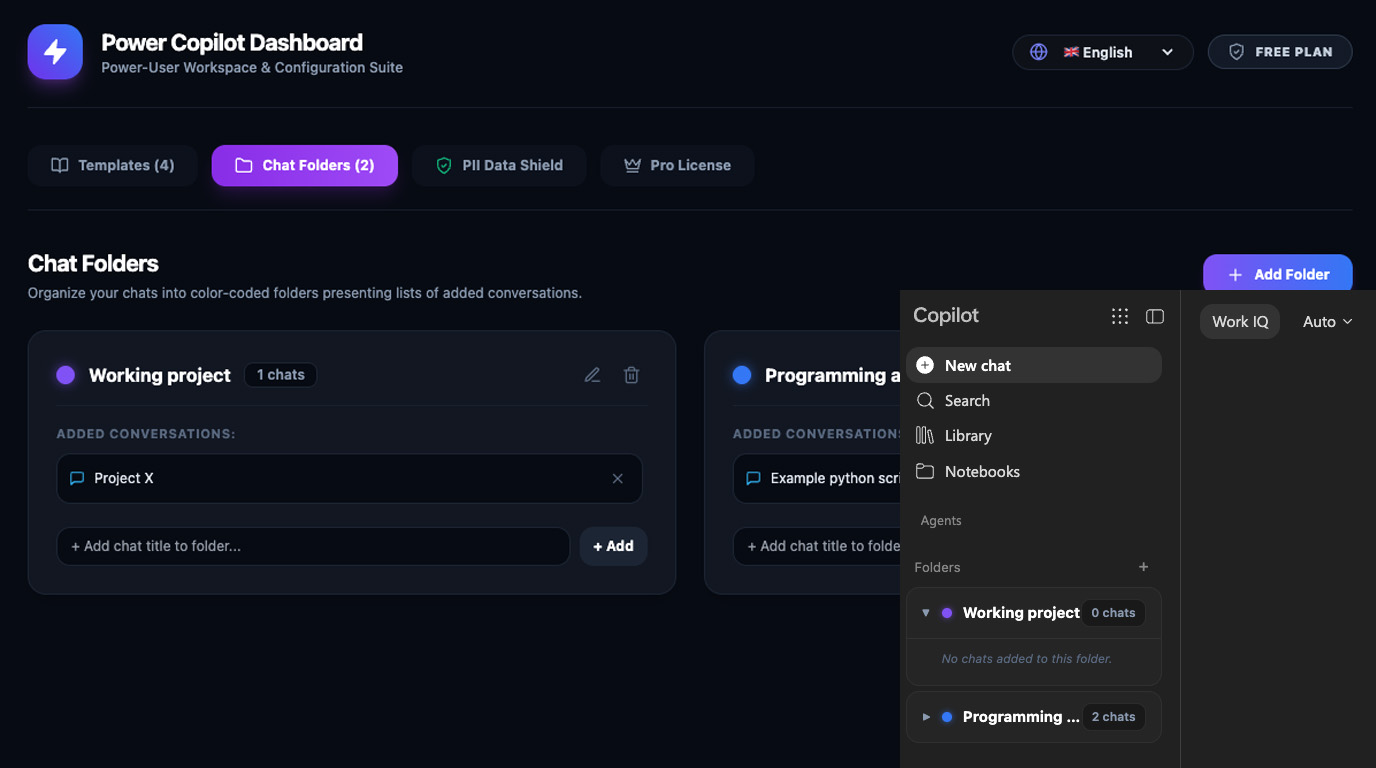
Organize your Copilot chat sessions into custom color-coded folders. Pin default auto-expanding folders with prominent green indicators and reorder folder hierarchy with ▲ / ▼ controls.

  • ✓ Create, rename, and color-code custom chat folders
  • ✓ Pin default auto-expanding folder with prominent green badge
  • ✓ Reorder position hierarchy using Move Up (▲) and Move Down (▼)
  • ✓ Clean unified 2-row layout separating titles from action toolbars
Custom Chat Folders Feature Screenshot

Full-Width Canvas Mode

Maximize Copilot's chat container width (up to 100vw fluid canvas, 95vw bubble max-width) for effortless reading, code editing, and multi-column data comparison.

  • ✓ 100% fluid full-width response workspace for code & table comparison
  • ✓ Responsive message bubble formatting (95vw max-width & 90% message divs)
  • ✓ Dynamic style reversal cleanly removes injected styles when toggled off
  • ✓ Persistent layout preference across browser sessions
Full-Width Canvas Feature Screenshot

Diff & Compare Code & Text Inspector

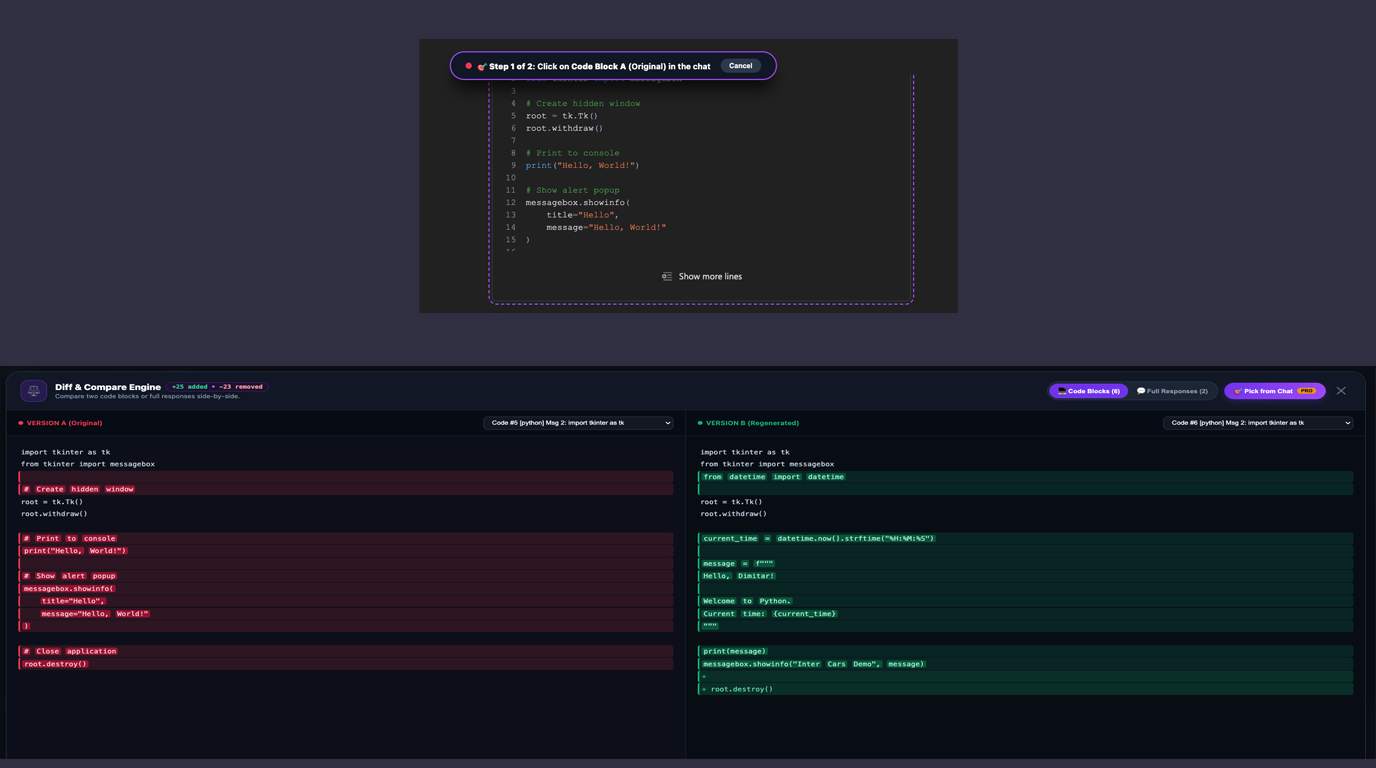
Compare two Copilot responses side-by-side or inspect code refactors and prompt variations line-by-line with visual addition (+), deletion (-), and modification diff indicators.

  • ✓ Side-by-side split view comparison of Copilot responses
  • ✓ Visual line-by-line code diff syntax highlighter (+ / -)
  • ✓ Ideal for auditing code refactors, prompt iterations & version changes
  • ✓ 1-Click copy or export of merged comparison results
Diff & Compare Code Inspector Screenshot

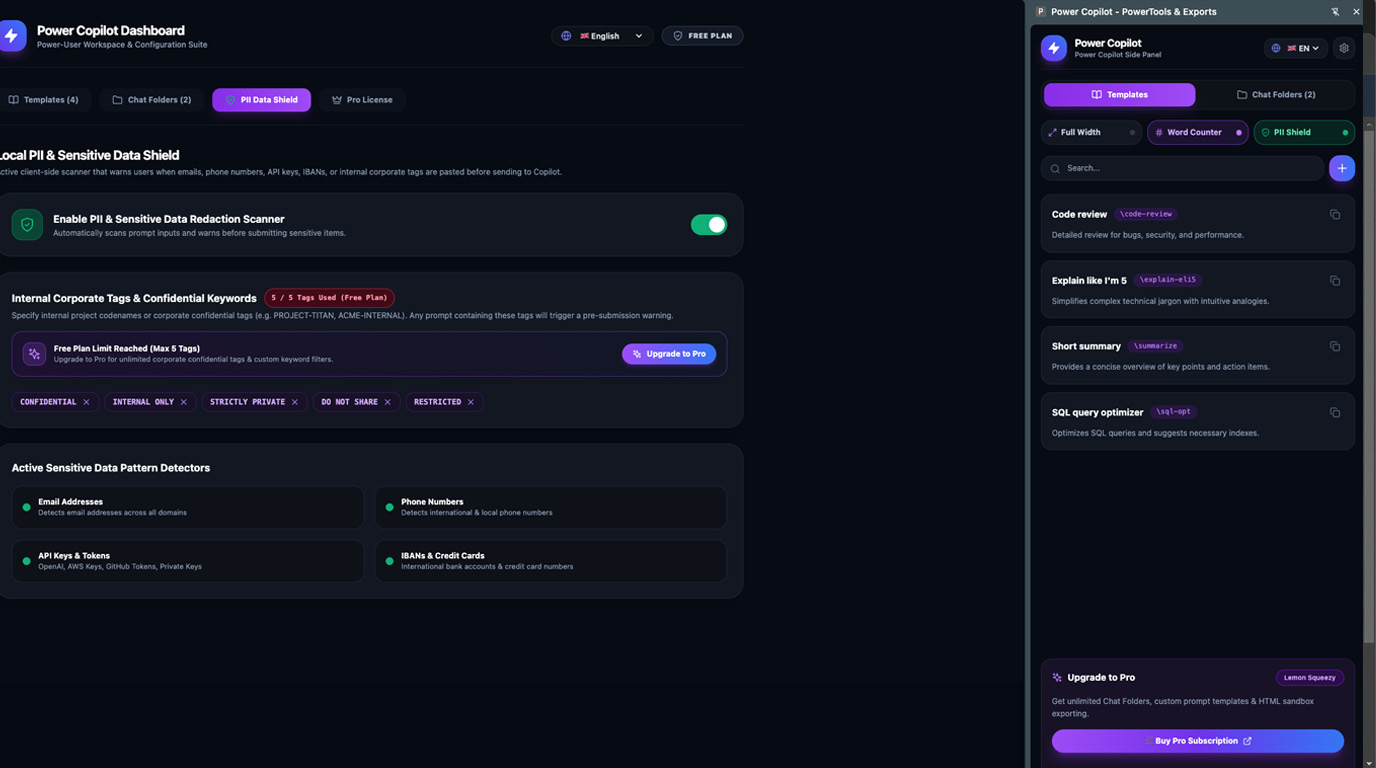
PII Redaction & Enterprise Security Guard

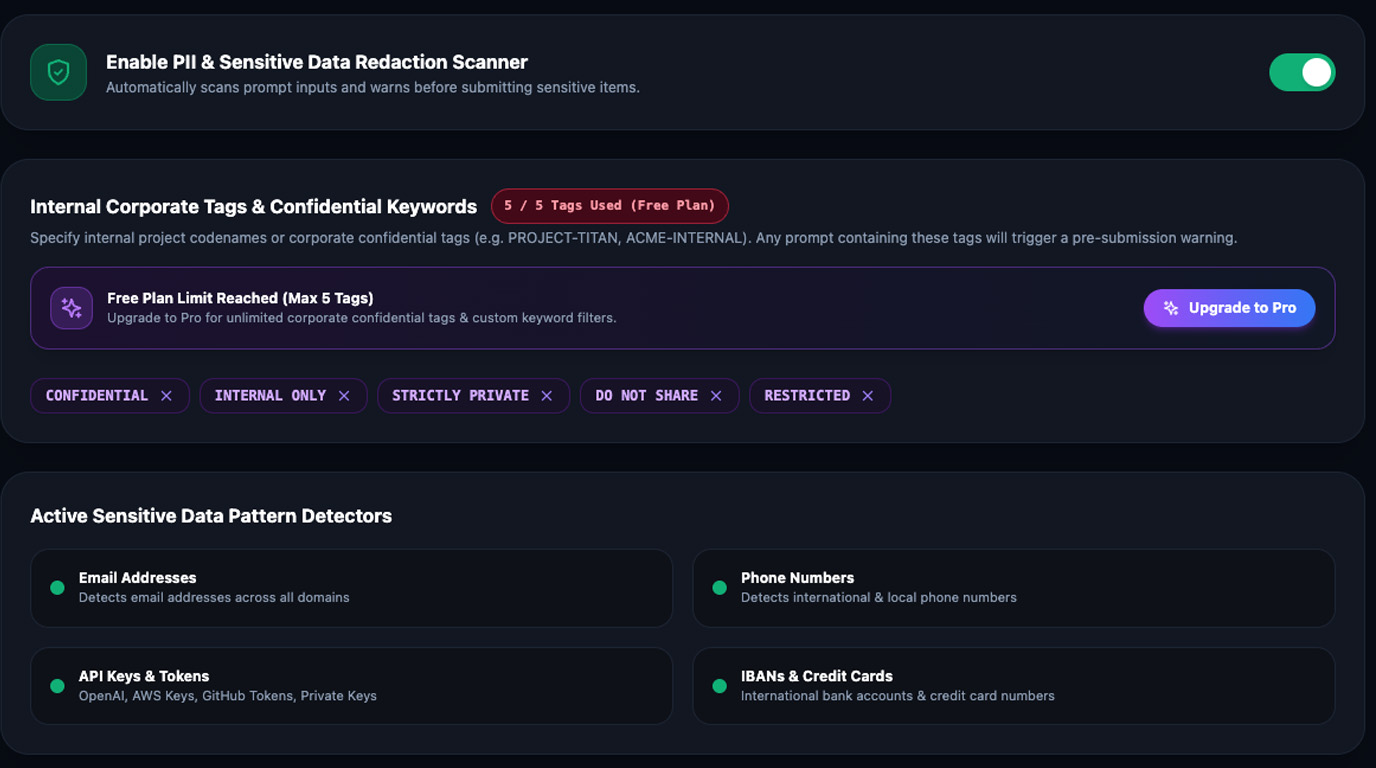
Scan prompt input fields in real time for sensitive data (Emails, Credit Cards, Social Security Numbers, Phone Numbers, and Custom RegEx patterns). Automatically mask PII before sending text to LLMs.

  • ✓ 100% client-side redaction (zero data leaves your device)
  • ✓ Detects & masks Emails, Credit Cards, SSNs, Passwords & Custom RegEx
  • ✓ Instant visual warning indicators before prompt submission
  • ✓ Dedicated toggle control card in Options and Side Panel
PII Security Scanner Feature Screenshot

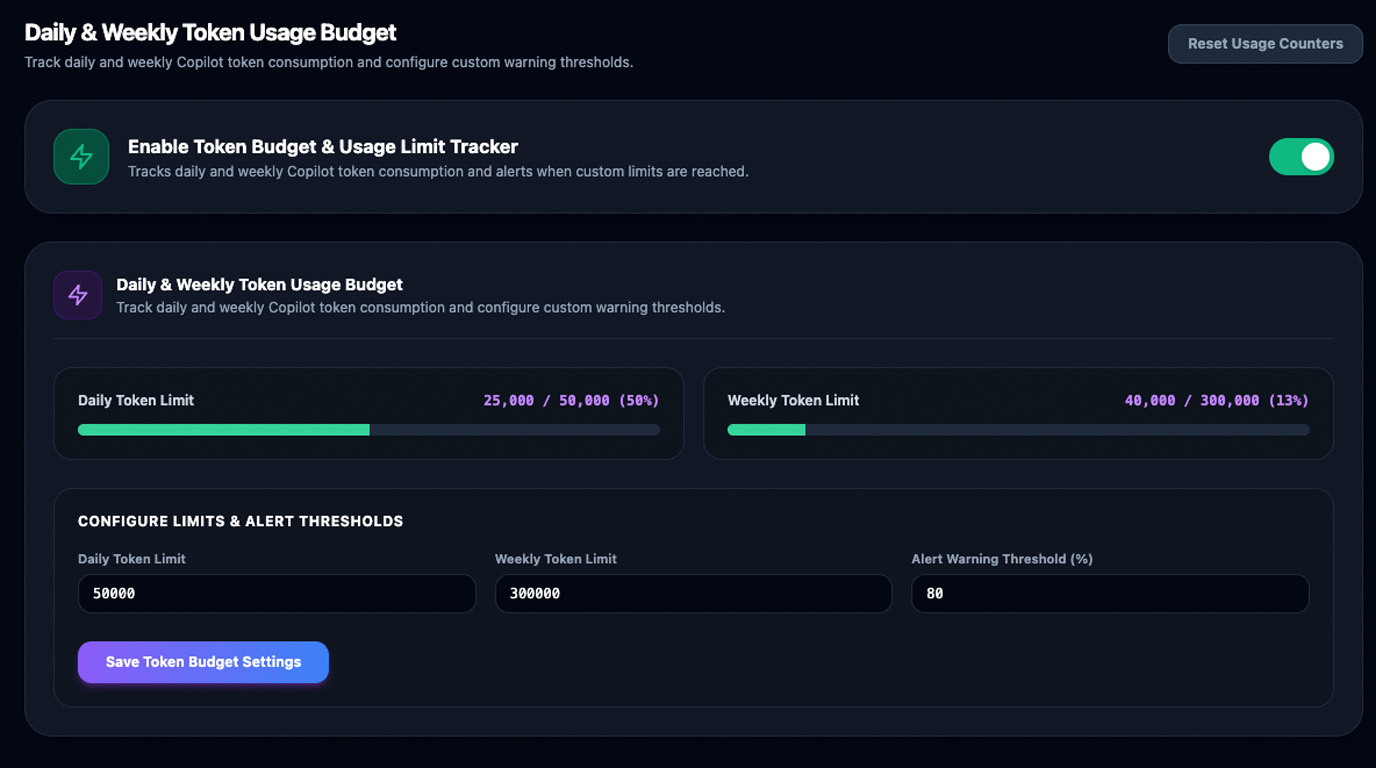
Token Usage Budget Tracker

Track daily and weekly token consumption against configurable limits (e.g. 50,000 daily / 300,000 weekly). Displays visual warning alerts when consumption exceeds configurable percentage thresholds (e.g. 80%).

  • ✓ Real-time daily & weekly token budget consumption tracking
  • ✓ Configurable visual warning thresholds (e.g. alert at 80% usage)
  • ✓ Floating usage widget in sidepanel and content toolbar
  • ✓ Prevents unexpected Copilot quota lockouts & rate limits
Token Usage Budget Tracker Screenshot

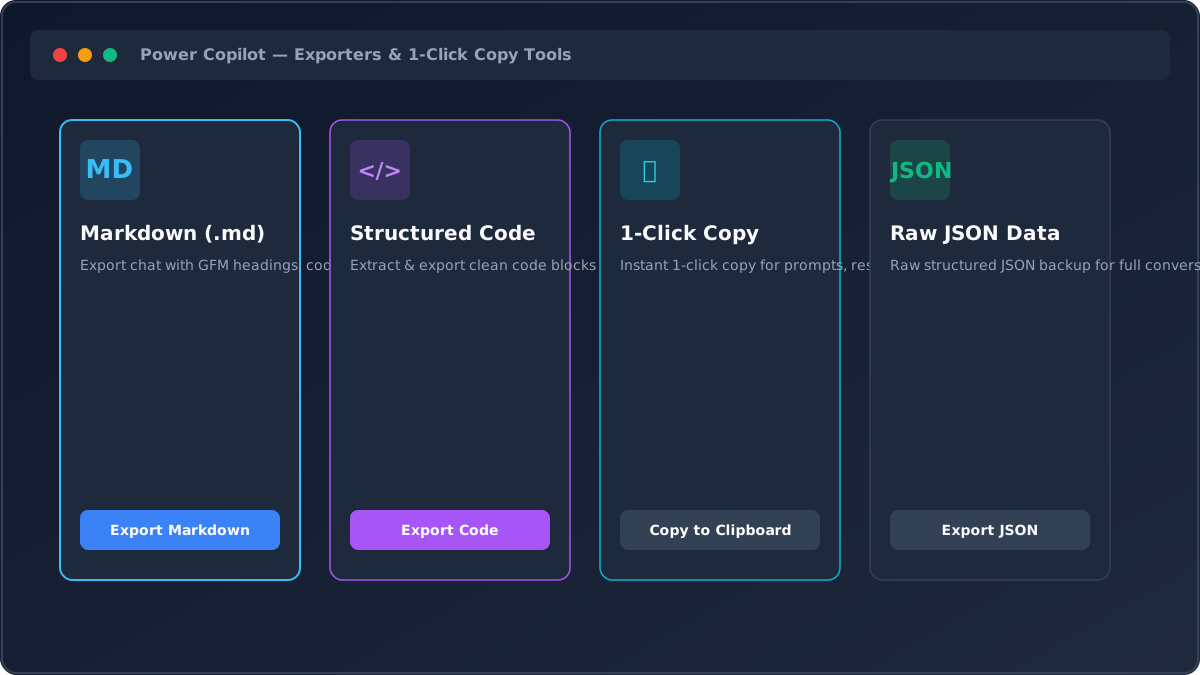
Local Exporters & 1-Click Copy Tools (Markdown, JSON, Code Snippets)

Export entire conversation histories or structured code into Markdown (.md) or raw JSON, with instant 1-click copy functions for prompts, responses, and code snippets.

  • ✓ Export full chats or structured code blocks into GFM Markdown (.md)
  • ✓ 1-Click Copy functions for instant prompt & response clipboard sharing
  • ✓ Raw JSON data backup for complete conversation data portability
  • ✓ Clean code snippet extraction with language syntax preserved
Local Exporters & 1-Click Copy Tools Screenshot

Side Panel Workspace, i18n & Global Accessibility

Access prompt templates, folders, exporters, diff tools, and token budgets inside Chrome's native Side Panel. Fully localized in 5 languages (EN, DE, PL, ES, BG) with global Escape (Esc) key modal dismissal.

  • ✓ Seamless Chrome Side Panel integration alongside any tab
  • ✓ Full UI localization for 5 languages: English, German, Polish, Spanish & Bulgarian
  • ✓ Global Escape (Esc) key instantly closes all open modal dialogs
  • ✓ Direct PRO Options Routing (options.html#pro)
Chrome Side Panel & i18n Feature Screenshot

Pricing Plans

Start free forever, or upgrade to PRO to unlock unlimited PowerTools.

Monthly Billing
Yearly Billing SAVE 20%

Starter (Free)

Essential PowerTools for everyday Copilot users.

$0 / forever
  • ✓ Up to 5 Folders
  • ✓ Up to 5 Prompt Templates
  • ✓ Backslash Commands (\) Autocomplete
  • ✓ Full-Width Canvas Mode
  • ✓ Diff & Compare Code Inspector
  • ✓ Token Usage Tracker & Counter
  • ✓ Basic PII Security Scanning
  • ✓ Local Exporters & 1-Click Copy (MD, JSON, Code)
  • ✕ Unlimited Folders & Templates
  • ✕ Custom RegEx PII Scanning Tags
Install Free Extension

Frequently Asked Questions

Everything you need to know about Power Copilot installation, privacy, and licensing.

Installation takes less than 60 seconds! Download the extension package, open chrome://extensions (or edge://extensions), toggle Developer Mode on, click Load Unpacked, and select the extension directory. Power Copilot will immediately activate on Microsoft Copilot web pages.

No! Power Copilot operates with a 100% local-first architecture. All prompt templates, chat folder organization, token counters, and PII redactions happen entirely within your local browser storage. We never collect or transmit your chat text to external servers.

The PII Security Guard scans your input prompt in real time for confidential data (emails, credit card numbers, SSNs, phone numbers, and custom regex rules). It automatically redacts sensitive tokens before the prompt is transmitted to LLMs.

Yes! A standard PRO license key allows activation on up to 5 personal devices (e.g. work laptop, personal desktop, and secondary workstation).

You can cancel anytime via the customer portal. Upon cancellation, your PRO features remain active until the end of your billing cycle, after which your account cleanly reverts to the Starter Free tier without data loss.

Ready to Supercharge Your Copilot Experience?

Join thousands of professionals using Power Copilot to save time, secure data, and boost AI productivity.